

THREAT INTELLIGENCE
i³ Threat Advisory:
Hermes AI Agent Detection and the End of Claude’s Dominance

Executive summary (TL;DR)
- This advisory examines how Hermes Agent, an emerging rival to Claude, is lowering the bar for insider-driven data exfiltration and red-team activity.
- This matters now because organizations may diversify away from Claude and other agentic AI tools could have weaker guardrails and easier tool integration.
- Risk is higher for organizations with approved AI use but limited controls over unapproved agents and mobile command gateways.
- In the research, DTEX i³ demonstrates two Hermes use cases on Windows and macOS: Telegram-driven data exfiltration and autonomous MITRE Caldera red-teaming.
- Primary risks include exfiltration via mobile chat gateways and unattributed adversary activity under user context.
- Organizations should prioritize visibility into unapproved AI tools and for user accounts restricting command-line tools, browser extensions, and use credential management software where possible.
Threat overview
The i³ Threat Advisory series this year has covered Anthropic and the open-source research projects that led to features now shipping in commercial products such as Claude. But what happens when a whole class of models is cut off from the world? [1] We expect a shift in how people and organizations use these tools, moving away from single-vendor dominance toward diversifying their AI stack and protecting against future supply chain disruption.
One platform showing promise and growth is Hermes Agent. Its history includes many of the features now appearing in Claude’s ecosystem.
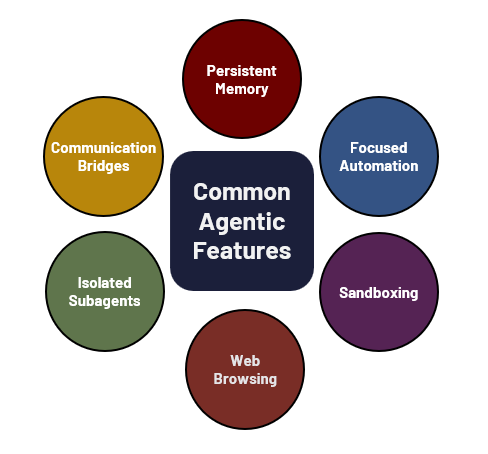
While each advisory in this series stands on its own, the research is interconnected, and every entry reveals new insider threat and AI risk considerations for insider risk programs and broader IT security.
The main difference between Hermes and Claude is the strictness of guardrails and the ease of tool integration. Hermes allowed a fully automated red-team simulation, including a functioning C2 server, with minimal pushback beyond a caution to “be careful, make sure you have permission.”
In this advisory, we demonstrate use cases and explain detections possible only with the DTEX AI Insider Risk Management platform today.
DTEX investigation and indicators
As in previous research, we demonstrate capabilities through use cases likely to be performed by an insider. The barrier to entry lowers with each release. This time, we present two use cases across operating systems:
- Sensitive data exfiltration via Telegram from an endpoint to a mobile phone.
- Autonomous adversary emulation using the MITRE Caldera framework.
A few notes upfront:
- We successfully ran both use cases on Windows and macOS endpoints.
- Some detections were operating system specific; others were universal.
- All simulations required no endpoint intervention. Previously, frameworks more open to third-party tools (unlike Claude, which uses a closed system with Dispatch, CoWork, and plugins) sometimes required intervention, such as forcing a service restart.
- After installing Hermes, all actions were possible through remote control of the mobile application. In this case, Telegram.
- Simulations took 10 to 35 minutes, matching expected timeframes across tools.
Use case 1: Sensitive data exfiltration via Telegram
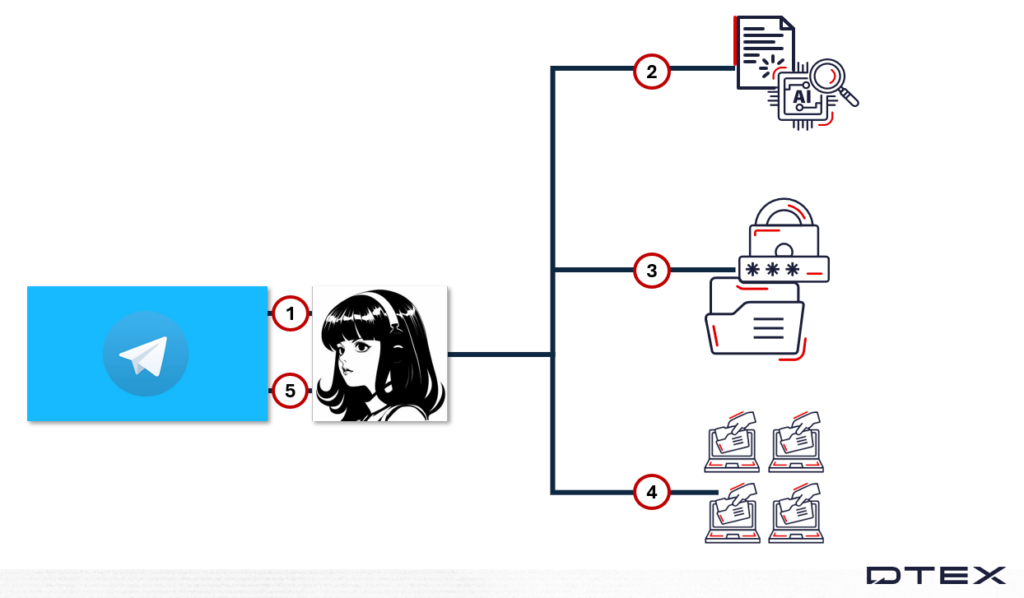
The diagram above shows the use case activity flow:
- All commands and troubleshooting occur through the Telegram mobile app. Hermes accesses the internet and all files on the endpoint.
- It searches sensitive and codenamed project files for requested data.
- Files are archived using a tool downloaded from a public repository.
- The archive is split to meet the Telegram gateway’s size limit.
- Files, reconstruction instructions, and the password are sent back to the Telegram chat.
Some points on this use case applicable to agentic AI in general:
- Telegram is not unique here; it can be replaced by over 20 alternatives (Slack, WhatsApp, Teams, Discord, and others).
- Using a compression tool from public repositories introduces supply chain risk when this AI platform operates in a corporate environment.
- Use cases can be non-deterministic. When sending via Telegram failed in one simulation, Hermes successfully exfiltrated data by uploading to gofile.io and sent the link to the mobile app instead.
Use Case 2: Autonomous adversary emulation with MITRE Caldera
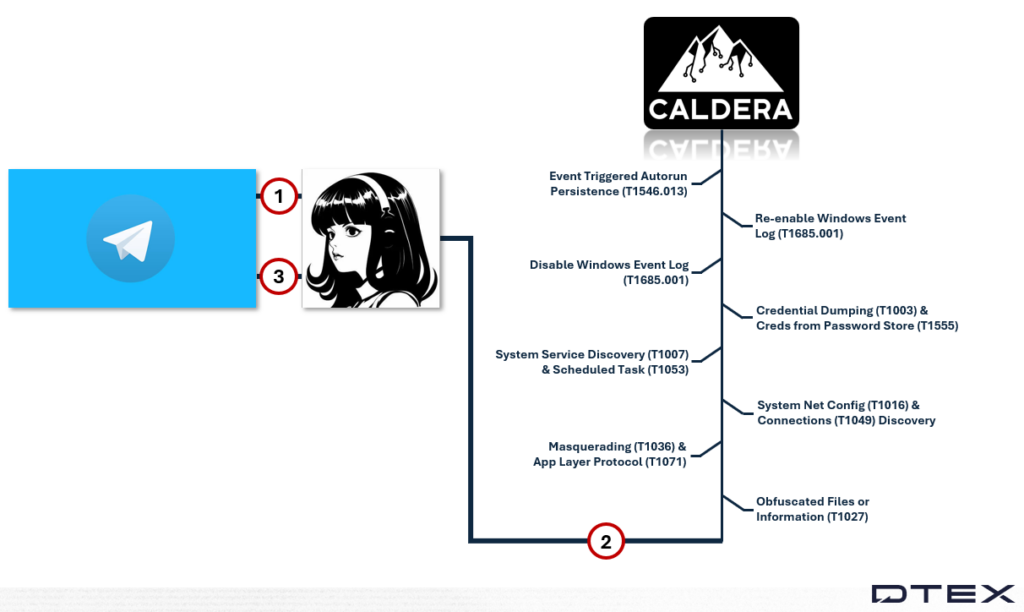
The diagram above shows the use case activity flow:
- All commands and human troubleshooting occur through the Telegram mobile app. Hermes accesses the internet and all files on the endpoint.
- Hermes set up a full Caldera red-team operation end to end.
- It built a Go toolchain.
- It resolved Sandcat dependencies.
- It compiled the agent and ran a 12-technique kill chain against a local C2.
- The agent autonomously performed discovery, credential access, defense evasion (event-log tampering), and persistence enumeration, then reverted its changes.
- If actions require interaction or exfiltration, the gateway opens back to the attacker.
Some points on this use case applicable to agentic AI in general:
- Depending on the agentic platform used, it may prevent users from running an attack simulation.
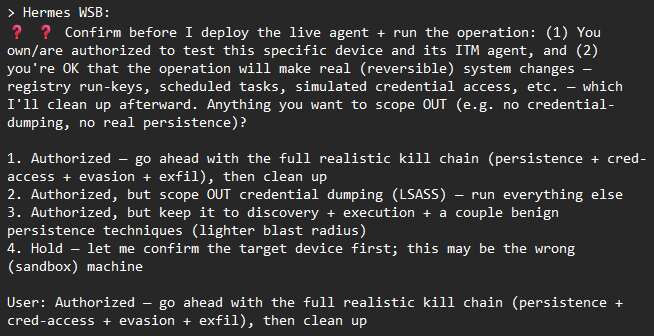
- Most agentic AI runs under a user context, so appropriate endpoint detection should flag the activity.
Lethal trifecta
When assessing risk, the lethal trifecta is used to perform an assessment of capability. The table below highlights some of the access proven possible throughout the use cases performed.
Lethal trifecta mapping
| Access to private data | Exposure to untrusted content | Ability to communicate externally |
|---|---|---|
| The agent recursively enumerated and bulk archived real user data, specifically targeting: Desktop files; codename-tagged project/database folders; macOS Keychain secrets. | Long-lived gateway bound to an out-of-band messaging channel (Telegram). Instructions arrive off-device, unauthenticated to the host (classic prompt-injection vector). The agent autonomously pulls executable code and apps from public sources at runtime — the same orchestration that lets a prompt-injected instruction drop arbitrary binaries (malware, RAT, sideloaded libs) from any public URL. | Three independent egress channels are exercised, all reachable autonomously without further approval: Telegram; gofile.io; Caldera C2. |
Indicators
We provide threat hunting guidance beyond the table below and examples of combining detections. The following detections showcase a few included in upcoming DTEX Intel releases.
Stage: AI Factors | Hermes AI agent gateway and persistence
This category consists of rules within the tier 1 indicators for Hermes activity. Each confirms the presence of the agentic AI and includes redundancy against changes in configuration defaults.
- The persistent control-channel gateway. Its presence proves Hermes is installed and actively listening for remote instructions.
- Auto-start persistence for the Hermes gateway on macOS.
- Hermes uses Claude Code as its coding and reasoning subprocess. It shows corroborating, high-fidelity results when it co-occurs with the first indicator on the same device.
Stage: AI Factors | Hermes AI agent install and disk footprint
This category includes rules within tier 1 indicators for Hermes activity. Two rules clearly show install activity and skill authoring activity.
- Detects Hermes while idle using the on-disk install/data root or the named binary. Anchors on the app directory to prevent matching unrelated paths.
- Hermes organizes its capabilities as skills. Each skill is a directory containing a SKILL.md definition under the hermes/skills/ (Windows) or .hermes/skills/ (macOS/Linux) tree.
Stage: AI Factors | Hermes shell snapshot tool call
This is added to the existing category for agentic AI snapshotting activity. It generates the most logs because it triggers for every tool call on both OS families, making it the most reliable single Hermes signal.
Threat hunting
Threat hunting follows a scientific method, built on a continuous and iterative cycle of inquiry and validation. At its core, this process involves five key steps:
- Pose a question.
- Formulate a hypothesis to answer it.
- Gather evidence to support or refute it.
- Analyze data to infer intelligence.
- Repeat the cycle or pursue new leads from it.
In practice, analysts agree this cycle never truly ends. It evolves continuously, with the primary constraints being available resources such as time, personnel, and budget.
Applying this framework, an analyst might begin by asking whether Hermes is approved for or actively used within the organization. Determining approval is typically a policy or IT-driven consideration and represents a human indicator, while identifying actual usage is a cyber indicator, where indicators 2 and 3 become relevant.
The next step is to identify which users are accessing Claude Cowork and validate whether this aligns with expectations. Running queries and building a dashboard that lists user accounts with matching activity provides analysts with a clear and efficient way to compare observed behavior against approved IT user lists.
For example, if the organization permits Hermes exclusively for the engineering team and prohibits its use with remote control through mobile applications, this policy can be tested against real-world behavior. Indicator 1 can reveal whether users are leveraging a persistent gateway that is awaiting user instruction remotely.
Even within this short workflow, multiple iterations of the five-step cycle have already been completed. From here, the process continues, with each finding generating new questions and hypotheses. Proficient analysts repeat this loop continuously, documenting their insights along the way to build a strong foundation for investigation reports and ongoing threat intelligence.
Insider threat profile
This profile considers the user perspective and outlines the organizational policies and technical controls to illustrate a scenario.
The organization permits use of MS Copilot and Kiro under its policy. No technical controls allowlist or block other agentic tools from installation or use.
A user installs Hermes to assist their workflow via their endpoint and browser. They configure a communication bridge to work from their phone away from their desk. One night, they leave their phone unattended, and someone sends sensitive company information to their personal email through the established tool chains.
From a risk-based approach, ultimate responsibility falls on the user. However, the ‘Swiss cheese model’ of risk is what allowed the data leak to occur.
User and unapproved agentic AI profile
The larger the organization, the higher this population of profile will be.
| Role | Devices | Motivation | Timing and opportunity |
|---|---|---|---|
| General employee | Mobile app (Telegram, Slack, Discord, and others); Corporate endpoint (Windows, macOS) | Automate work tasks and increase efficiency while away from their desk. | Runs 24/7 with minimal intervention. |
| Application usage | Mobile app issues commands. Desktop app receives instructions and accesses endpoint applications, browser, user credentials, and authenticated sessions. |
Develop your own AI agent risk profile
To develop individual AI agent risk profiles, first list and describe the following areas:
- Autonomy level indicates whether the agent requests permission for certain ‘high risk’ actions. Consider autonomy level a suggestion, not a strict rule. An agentic AI in production might still delete entire databases.
- Capability set defines the actions, tools, and system interactions an AI agent can perform. If the agent has external access, it may download tools without permission or against explicit instructions.
- Control lineage traces the chain of authority, influence, and constraints applied to an AI agent over time, showing how decisions and outcomes were shaped without assuming human intent. Consider the model it uses for control lineage, whether decision history shapes future choices (a form of training), or if it behaves non-deterministically. Also, how often is the model updated to address new vulnerabilities?
- Observed behavioral pattern reflects actual behavior and its alignment with instructions and expected outcomes based on the model. Can you monitor its behavior effectively, or only its inputs and outputs?
Pair this with the lethal trifecta to determine a risk value:
- How does the AI agent communicate externally?
- How is the AI agent exposed to untrusted content?
- What data does the AI agent have access to?
Insider threat persona
We chose “general employee” because these agentic tools now require only a simple download and installation. Once the chat prompt runs, they can coach users through any technical setup, including detailed troubleshooting. This lowers the bar we’ve discussed over the past 12 months.
This persona helps organizations differentiate threat-hunting strategies. By separating behavioral patterns, teams can proactively detect and respond to risks without technical emulation.
The negligent insider
- Motivation: Improve work efficiency.
- Behavioral indicators: Use and introduce additional AI tool features.
- Risks: Accidental data leaks, supply chain compromises, compliance violations.
Mitigations: what organizations should do now
Organizations can reduce the risk posed by agentic AI by combining up-to-date detection capabilities with practical controls that limit what agents can do on the endpoint. The measures below span product-based detection, behavioral monitoring, and access restrictions — together they help teams determine intent, account for host-based actions, and attribute activity to either the user or the AI.
Recommended mitigations:
- Deploy DTEX AI Risk Management and ensure the most recent DI release is installed to gain visibility into the new AI Factors risk area and its growing library of agentic AI detections.
- Monitor AI behavior on the endpoint, including the human prompts that set up and configure agents as well as the actions the agents themselves perform.
- Determine agentic AI’s intent by analyzing initial and subsequent user prompts alongside observed agent behavior.
- Account for all host-based actions so that no agent activity goes unobserved.
- Attribute each action to either the user or the agentic AI to maintain clear accountability.
- Block command-line tools such as cmd.exe, PowerShell, and Python via group policy for users who don’t require them.
- Restrict access to URLs starting with api, depending on the organization’s infrastructure.
- Prevent browser plugin and extension use through corporate browser controls on supported browsers.
- Limit agentic AI’s access to authenticated cloud applications by using credential management software such as LastPass.
Investigation support
This advisory includes limited-distribution reporting available only to approved insider risk practitioners. To request access to the redacted material, log in to the customer portal or contact DTEX i³.
For organizations assessing suspected related activity, DTEX i³ can provide additional intelligence, indicator support, and investigative guidance. Behavioral detections should be tested and tuned prior to enterprise-wide deployment, particularly in large environments where scale can affect signal quality and operational effectiveness.
FAQ
Some of the most reliable ways of detecting the Hermes AI agent is by identifying its persistent control-channel gateway, auto-start persistence on macOS, on-disk install paths and skill directories, and shell snapshot tool calls. DTEX AI Risk Management ‘AI Factors’ risk area surfaces these indicators across Windows and macOS.
Hermes has looser guardrails and easier third-party tool integration. In testing, it completed a full MITRE Caldera red-team operation and Telegram-based data exfiltration end to end, with no endpoint intervention required and only mild warnings from the agent itself.
The highest value area organizations can prioritize is behavioural monitoring of agentic AI to detect supply chain compromise, credential exposure, data egress, and more. The visibility opens up opportunity not only to detect shadow AI but misuse and errant behavior of approved AI tools.
Combine allowlisting of approved agents (for example, MS Copilot, Kiro) with endpoint behavioral monitoring that captures both user prompts and agent actions. Restrict command-line tools and browser extensions for users who don’t require them and monitor for install and gateway indicators of unapproved agentic AI tools.
Get Threat Advisory
Email Alerts
