

THREAT INTELLIGENCE
i³ Threat Advisory:
Detecting Claude Cowork Insider Threat Activity
Executive summary (TL;DR)
- This advisory examines Anthropic’s Claude Cowork, Chrome plugin, and Dispatch activity that can enable insider threat workflows.
- This matters now because AI agents can act across endpoints, browsers, SaaS apps and files.
- Risk is highest for organizations allowing Claude Cowork, browser plugins or unmanaged AI agents.
- In this investigation DTEX simulated Salesforce-to-Outlook and file-archive transfer activity.
- Primary risks include data exfiltration and low visibility on unmanaged devices.
- Organizations should prioritize AI agent visibility, prompt analysis, endpoint attribution and tuned behavioral detections.
Threat overview
Major AI developers are moving quickly to bring agentic capabilities into enterprise environments. Features that begin as research projects or experimental workflows are now being productized, integrated and adopted by trusted vendors. Anthropic is one of the companies shaping this shift, with Anthropic Claude increasingly used in business environments.
Why does this matter?
Passing IT and cybersecurity checks does not eliminate insider threat risks. It means security teams need a clearer way to see how AI agents operate once they are inside approved workflows.
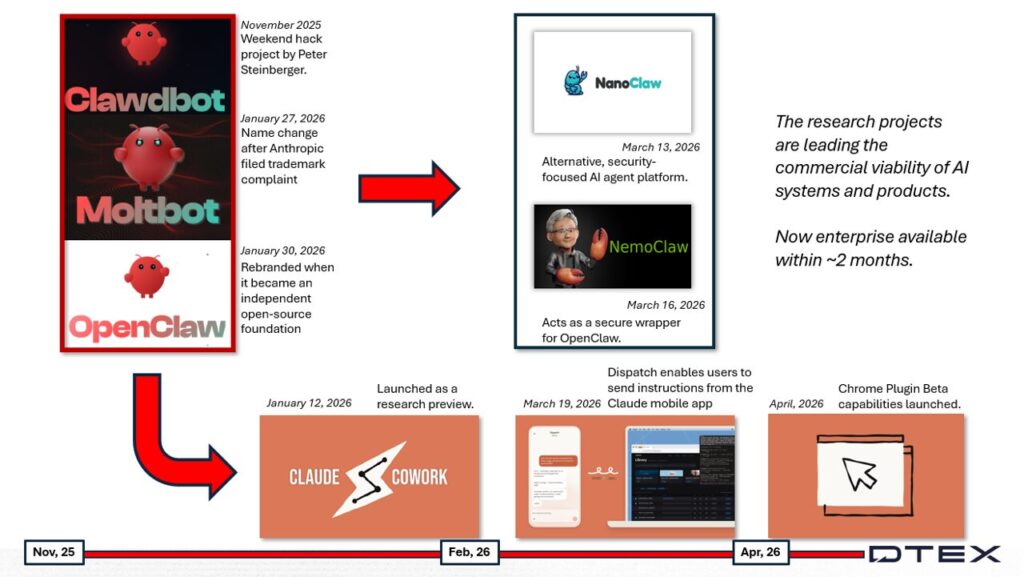
We are five months into the year and continuing behavioral research into agentic AI, including findings from iTA-26-01 and iTA-26-03. Some findings are new. Others extend risks that have grown since public generative AI adoption accelerated in November 2022 (you can catch up on that conversation here: Anthropic’s Mythos and the New Insider Threat Reality). The broader issue remains the same: organizations are introducing AI agents that can interact with user sessions, enterprise applications, files and external services.
In the last iTA, we discussed how open-source research projects would become new software tools or merge into existing products after commercial viability was proven. Claude Cowork and Dispatch are part of that wider movement toward enterprise-ready agentic AI.
DTEX investigation and indicators
We ran multiple use case simulations with Anthropic’s Cowork to develop the indicators added to the next DTEX Intel release. This iTA discusses a few in detail. To see the available indicators, skip to the indicators table below.
We cover two cases:
- The agent summarizes information from Salesforce and pastes it into a draft Outlook email ready for exfiltration.
- The agent archives selected files and transfers them via the Cowork app.
Key points from this research:
We endeavour to fill visibility gaps. Since Claude is widely used, understanding why it performed an action is as important as knowing if it can perform one. This insight derives from prompt analysis, agentic AI steps and observed intent.
The research focused on assessing the Dispatch application’s versatility and DTEX’s visibility. Each use case ran through the mobile application connected to a desktop app.
We do not aim to complete the full insider threat kill chain, only to understand functionality since we already know certain actions are possible. For example, the agent can send a draft email.
Use case 1: Salesforce summary copied into an Outlook draft
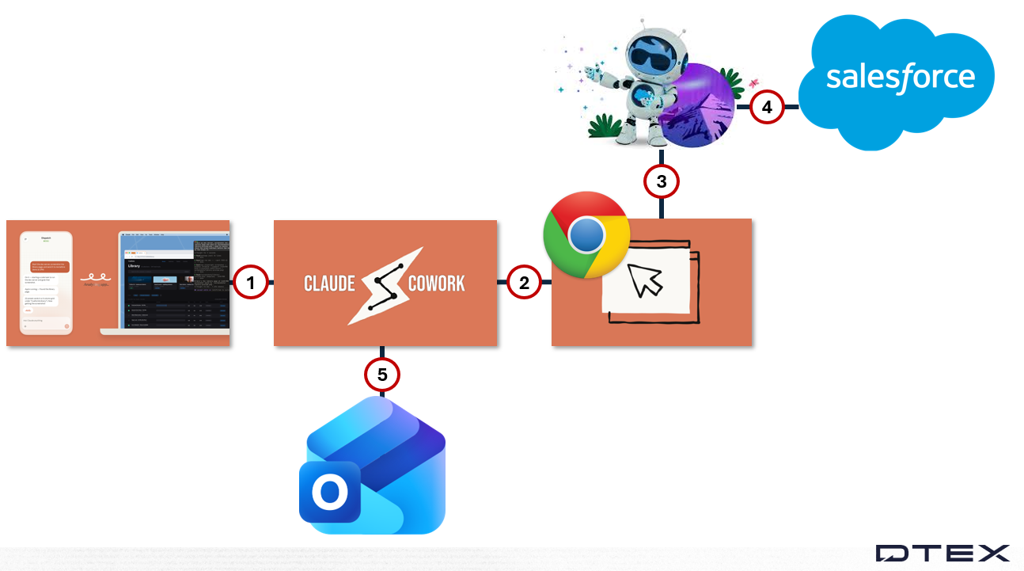
The diagram above shows the use case activity flow.
- Dispatch issues commands. Prompts are not visible because the application runs on a mobile phone, and the forwarder cannot inspect the data.
- Claude Cowork receives instructions from the user’s mobile device and issues commands through the browser plugin.
- The plugin uses the Salesforce AI feature Agentforce.
- Agentforce summarizes at-risk opportunities and copies the data to the clipboard.
- Cowork opens Outlook, creates a draft email, and pastes the summary into the body.
Several findings from this use case apply to AI agents more generally:
- Consolidating browser agentic functionality into Claude reduces mistakes when AI agents from two providers hand off instructions.
- The browser plugin uses the user’s authenticated Salesforce session, avoiding authentication challenges from automation, often the biggest hurdle.
Use Case 2: File archiving and transfer through Cowork
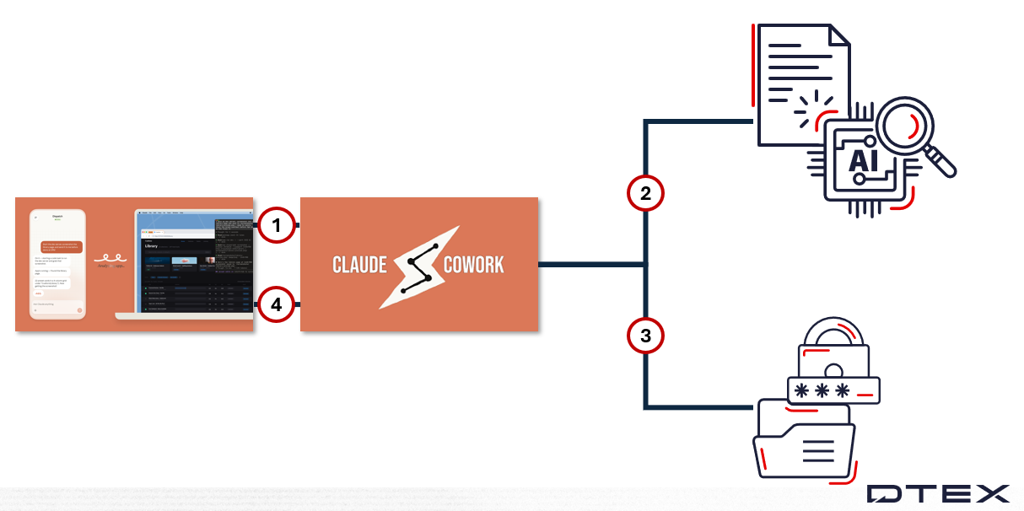
The diagram above shows the use case activity flow.
- Dispatch issues commands. Prompts are not visible since the application runs on a mobile phone, and the forwarder cannot inspect the data.
- Claude Cowork receives instructions from the user’s mobile and accesses files requested for archiving.
- The Cowork application archives the files.
- Claude performs the FileRead and PortAccessed activities, showing the archived file sent via Anthropic API and Anthropic files IP.
Several findings from this use case apply to AI agents more generally:
- We do not have direct visibility of which files are read. This may be due to the context Claude accessed without needing raw files. Further testing is required.
- The process archiving the files was attributed to NTOSKRNL.exe, a kernel-level file-system mini-filter that reports the create but does not preserve the user-mode writer; the user-mode write is performed by the Cowork application.
Additional findings
Timing
For each use case, we timed the entire activity from start to finish. The longest use case was use case 1, at 24 minutes. That simulation involved Claude using Dispatch, Cowork, the browser plugin, a cloud service, and another Agentic AI. The shortest was use case 2, at 10 minutes, likely because we removed the browser plugin from the activity chain.
From an insider threat perspective, mobile-based AI agents can perform reconnaissance, aggregation, exfiltration, and cover tracks in under half an hour.
Common process tree
The Cowork process tree was similar across all use cases. This consistency supports fingerprinting when Dispatch interacts with Cowork, alerting analysts to this activity.
If organizations permit this activity, the same consistency can also raise the noise floor and reduce detection effectiveness. Approved use needs to be monitored with policy context, not just technical matching.
One notable finding was that Cowork issued a command every time to find competing IDE and Agentic AI using tasklist in a command prompt. We see no legitimate reason for this command, even in deconfliction. We assume Anthropic is profiling tools their users employ to guide their product roadmap.
Patterns
Fifteen common patterns appeared across all analyzed use cases and were incorporated into visibility and detections. Most patterns were shared, but some related to actions unique to specific use cases. For example, data archiving and exfiltration appeared only in use cases where those actions occurred.
Lethal trifecta mapping
| Access to private data | Exposure to untrusted content | Ability to communicate externally |
|---|---|---|
| Every simulation began with the mobile Claude Dispatch feature. The agent received natural-language instructions from an out-of-band channel and acted on the user’s desktop. Many sub-actions (Salesforce navigation, SharePoint walk, Outlook composition) are driven by Cowork itself using free-text DOM/accessibility-tree summaries (visible at the endpoint as Anthropic API message bodies). The agent’s prompt context combines:
|
|
Indicators
We will cover the indicators differently in this iTA compared to previous ones. Since the new AI product on the latest DAS release is required for these activity indicators we will publish research findings on the detections to help insider threat analysts threat hunt the activity independently.
We will provide threat hunting guidance beyond the indicator table, including examples of how detections can be combined. This aligns with how we compiled indicators in the DTEX Intel release.
Detections
The detections below are a representative sample of what we generated using the platform and will form the basis for the threat hunting discussion that follows.
| Detection focus | What it identifies | Why it matters |
|---|---|---|
| Claude Code CLI execution by Cowork | Initial execution of the Claude Code CLI by the Cowork desktop agent. The detection relies on a consistent process tree where claude.exe is spawned from the Claude application with command-line parameters related to structured JSON input/output and tool authorization. | This pattern was foundational and common across observed simulations. In environments where Claude Code usage is not expected, this activity alone may justify alerting because of its high recall and precision. |
| Per-turn preflight behavior | Commands used to enumerate running processes, especially developer tools such as IDEs, through tasklist and filtering for applications like Cursor, Windsurf and VS Code. It also captures session data written and updated in the user’s AppData path. | This behavior appears consistently and is unique to Cowork in the investigation. The process activity and filesystem writes create a repeatable forensic trail for active agent operation. |
| Claude Chrome extension communication | Outbound communication from the Claude Chrome extension to the Anthropic API at api.anthropic.com. It uses known domains and extension-specific identifiers such as user-agent strings or Chrome extension origin values. | This is a strong indicator of browser-based AI agent activity and shows that an endpoint is interacting with an external large language model service through the plugin. |
| Anthropic API message content | Structured message payloads sent to the Anthropic API where the agent asks the model to locate or interact with SaaS interface elements such as buttons, input fields or AI assistant features. | These requests expose the agent’s step-by-step reasoning and operational goals in near-verbatim form. They provide high-fidelity evidence for both detection and investigation. |
Adjacent indicators
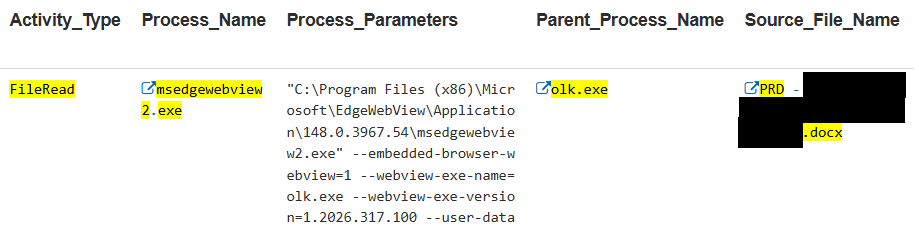
Agentic AI typically runs under the user context, making it difficult to distinguish human actions from agentic actions. This distinction often emerges from the process tree, where the parent process reveals the AI agent driving the activity.
Adjacent indicators relate to the DTEX Insider Threat Kill Chain. These include a user account accessing cloud services, email and sensitive files; aggregating and archiving content; and exfiltrating content through various services.
We have added new indicators to the next DI release, although many existing ones in the DTEX Library serve the same purpose.
Indicator: Outlook File Upload I5228
This indicator detects file uploads through HTTP inspection filtering. It tags the activity and serves as a basis for the next indicator, which correlates sensitive files.

Indicator: Outlook File Upload I5227
This correlation and trigger rule links the FileRead activity with the FileUpload. It helps determine additional information such as file directories, sensitivity labels, and related activity.
Threat hunting
Threat hunting follows a scientific method, built on a continuous and iterative cycle of inquiry and validation. At its core, this process involves five key steps:
- Pose a question.
- Formulate a hypothesis to answer it.
- Gather evidence to support or refute it.
- Analyze data to infer intelligence.
- Repeat the cycle or pursue new leads from it.
In practice, analysts agree this cycle never truly ends. It evolves continuously, with the main constraints being available resources such as time, personnel, and budget.
For Claude Cowork and Dispatch insider threat activity, an analyst might begin with a simple question: Is Claude Cowork approved for use in the organization, and is it actively used?
Determining approval is usually a policy or IT-driven consideration. That makes it a human indicator. Identifying actual usage is a cyber indicator, where Detection 1 and Detection 2 become relevant.
From there, the next step is to identify which users are accessing Claude Cowork and validate whether that aligns with expectations. Running queries and building a dashboard that lists user accounts with matching activity provides analysts with a clear and efficient way to compare observed behavior against approved IT user lists.
For example, if the organization permits Claude Cowork exclusively for the engineering team and prohibits its use with cloud services, this policy can be tested against real-world behavior. Detection 4 can reveal whether users are leveraging a browser plugin to access platforms like Salesforce, and this same logic can be extended to other cloud services across the environment.
Even within this short workflow, multiple iterations of the five-step cycle have already been completed. From here, the process continues, with each finding generating new questions and hypotheses. Proficient analysts repeat this loop continuously, documenting their insights along the way to build a strong foundation for investigation reports and ongoing threat intelligence.
Insider threat profile
The profile depends on whether the user needs Claude for daily tasks. If Claude is required, the next question is whether the user also requires Dispatch.
Claude agentic AI profile
In the last iTA, we assessed Agentic AI profiles generally. Now, we can examine a specific AI system with all its tools.
| Role | Device | Motivation | Timing and opportunity |
|---|---|---|---|
| Agentic AI helper | Mobile app Windows endpoint | Automate user tasks or requests when away from the endpoint | Runs 24/7 with minimal intervention |
| Application usage |
|
Develop your own AI agent risk profile
To develop individual AI agent risk profiles, first list and describe the following areas:
- Autonomy level indicates whether the agent requests permission for certain high-risk actions. Consider autonomy level as a signal, not a strict rule. For example, an agentic AI in production might still delete entire databases.
- Capability set defines the actions, tools, and system interactions an AI agent can perform. If the agent has external access, it may download tools without permission or against explicit instructions.
- Control lineage traces the chain of authority, influence, and constraints applied to an AI agent over time, showing how decisions and outcomes were shaped without assuming human intent. Consider the model it uses for control lineage, whether decision history shapes future choices (a form of training), or if it behaves non-deterministically. Also consider how often the model is updated to address new vulnerabilities.
- Observed behavioral pattern reflects actual behavior and how closely it aligns with instructions and expected outcomes based on the model. Can you monitor its behavior effectively, or only its inputs and outputs?
Pair this with the lethal trifecta to determine a risk value:
- How does the AI agent communicate externally?
- How is the AI agent exposed to untrusted content?
- What data does the AI agent have access to?
Insider threat persona
Personas apply only when a human meaningfully contributes intent or control, the concept does not apply to Agentic AI in isolation.
Although some AI agent behaviors resemble insider activity observable through cyber indicators, we do not attempt to match the cyberspace persona to the individual, where real-world actions infer motivation and intent.
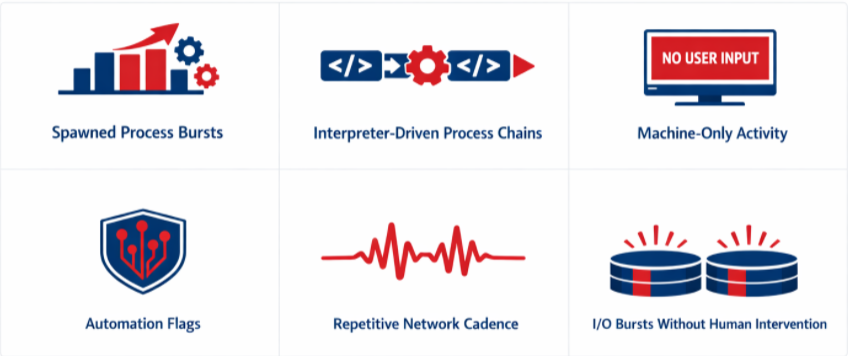
For agentic AI, we rely solely on signals detectable via technical monitoring. These include spawned process bursts, interpreter-driven process chains, machine-only activity (absence of other signals tracked by DTEX), automation flags, I/O bursts without human intervention or trigger, and repetitive network cadence.
Mitigations: what organizations should do now
Organizations should take a layered, behavior-driven approach to mitigating AI risks, combining visibility, control, and prevention across both user and system activity.
This includes adopting DTEX’s AI capabilities to detect AI-specific behaviors, while also implementing controls that limit unnecessary access to tools and infrastructure commonly leveraged by agentic AI.
The following actions help reduce exposure by improving detection, enforcing least privilege, and constraining high-risk functionality.
- Deploy DTEX AI Risk Management to enable detection of AI and Agentic AI behaviors through the new AI Factors risk area
- Ensure the latest DTEX Intelligence (DI) release is installed to maintain up-to-date coverage of emerging Agentic AI techniques
- Monitor human-to-AI interactions, including initial and follow-up prompts, to better understand intent and usage patterns
- Analyze endpoint activity to identify behaviors originating from AI agents versus human users
- Attribute actions across the host to distinguish between user-driven and AI-driven activity
- Assess whether AI agent intent can be inferred from prompt and execution behavior
- Account for all host-based actions performed by AI-enabled tooling and agents
- Restrict access to command line interfaces such as cmd.exe, PowerShell, and Python for users who do not require them
- Block access to API-related URLs where appropriate to limit backend communication paths used by AI agents
- Disable browser plugins and extensions through enterprise browser controls to reduce unauthorized AI tooling
- Control credential exposure by using secure password managers (e.g. LastPass) to limit AI agent access to authenticated applications
Investigation support
This advisory includes limited-distribution reporting available only to approved insider risk practitioners. To request access to the redacted material, log in to the customer portal or contact DTEX i³.
For organizations assessing suspected related activity, DTEX i³ can provide additional intelligence, indicator support, and investigative guidance. Behavioral detections should be tested and tuned prior to enterprise-wide deployment, particularly in large environments where scale can affect signal quality and operational effectiveness.
FAQ
The insider threat risk comes from AI agents, like Claude Cowork, acting through authenticated user sessions, endpoints, browsers, SaaS applications, and now mobile applications. In DTEX simulations, Claude’s Cowork and Dispatch were able to perform data aggregation, file archiving, Outlook draft creation, and externally communicate.
Organizations can identify Claude Cowork activity by monitoring process trees, tracking Claude Code CLI execution, observing per-turn preflight commands, and inspecting Chrome extension traffic to api.anthropic.com, along with API message content that may reveal agent intent. In contrast, Dispatch activity is more subtle, requiring finely tuned detections based on specific keywords or nuanced application behavior patterns.
AI risk increases because much of its activity can remain opaque to traditional detection and monitoring tools. This limits an analyst’s ability to accurately assess the intent behind agentic actions. Insider risk rises for the same reason, compounded by the fact that agentic AI lowers the skill barrier, enabling more individuals to carry out impactful actions, whether intentional or accidental.
Security teams should begin by determining whether Anthropic’s Claude Cowork, Dispatch, and related AI capabilities are approved for use, who is actively using them, and whether observed activity aligns with policy. They should then develop and tune behavioral detections before scaling visibility across the enterprise. Finally, enforcement controls should be applied to reduce overall risk exposure.
Get Threat Advisory
Email Alerts