

THREAT INTELLIGENCE
i³ Threat Advisory: How to Detect Nation State Insider Threats

Executive summary (TL;DR)
- This advisory examines how Salt Typhoon and Volt Typhoon espionage activity presents as a nation state insider threat.
- This matters now because edge device compromise sidesteps phishing and MFA defenses entirely.
- Risk is highest for critical infrastructure and telecom operators with slow patch management.
- In this advisory, DTEX i³ translates published espionage reporting into working insider risk detections.
- Primary risks include credential theft, lateral movement, undetected persistence, and hijacked software updates.
- Organizations should prioritize server behavior monitoring and PowerShell script block logging.
Threat overview
The Salt Typhoon and Volt Typhoon cyber espionage campaigns exposed how deeply critical infrastructure can be penetrated, and how quickly a compromised supply chain becomes an internal problem. Sensitive data was exposed, operations were disrupted, and the case for strong internal security and supply chain monitoring got considerably harder to argue against.
This Insider Threat Advisory (iTA) reviews current reporting on both groups and reads their behaviors and indicators through an insider risk lens. It draws on Joint Guidance: Identifying and Mitigating Living Off the Land Techniques, issued by multinational intelligence agencies, covering the techniques nation state actors in the Typhoon groups rely on.
Recent reporting shows both groups targeting vulnerable edge devices, bypassing phishing emails and MFA fatigue attacks by compromising those devices directly. Their strategy usually involves known vulnerabilities, and it works best against organizations that are slow to patch.
Why this reads as an insider threat
Once an actor holds valid administrator credentials and operates using native tooling, the distinction between an external intruder and a trusted insider stops being useful to a detection program. What remains is an account doing things that account has no business doing. That is an insider risk detection problem, and it is solvable with insider risk telemetry.
DTEX investigation and indicators
There is no shortage of published analysis on Salt Typhoon and Volt Typhoon, but almost none of it details an internal investigation report for an end-to-end attack. The closest and most detailed is the Joint Cybersecurity Advisory from June 2023, which walks through stages of the cyber kill chain with specific commands usable as atomic indicators. This section uses those to threat hunt and build rules, alongside other reporting and behaviors, to build a profile that strengthens early detection of nation state actors.
Initial foothold onto edge devices and servers
Based on our reading, the initial foothold gained by these Chinese-based state-backed attackers comes through active exploitation of vulnerabilities in edge devices, either via unpatched CVEs or the less likely zero-days, though a Microsoft blog indicates Volt Typhoon has used an unknown Fortinet exploit.
Best practice separates administrative and standard user accounts. This aligns with separation of duties: an edge device administrator account should not carry domain administrator privileges. Applying this minimizes the impact of a credential compromise, even where an attacker has bypassed multi-factor authentication (MFA).
From there, monitor those accounts for activity beyond their typical usage patterns — unusual login times, initial logins from unfamiliar devices, logins from locations inconsistent with the account’s profile, and suspicious command-line activity.
Abnormal hours of use
In iTA-24-08 i3 Threat Advisory: Printing Secrets, we covered an example of reviewing a single user’s activity profile. It shows insider risk practitioners how to get data on how an account is actually used. For server administrator accounts the pattern may be fairly sporadic while still sitting inside a recognizable workday. Where multiple people share an account, this loses much of its value, and it also runs against best practice.
Unusual location of login
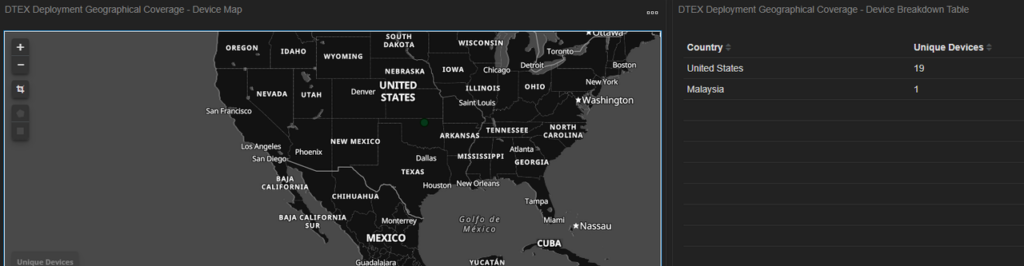
Even when attackers use VPNs, this remains effective, because their IP addresses will likely differ from those of authorized administrators. For remote access, server administrators should be added by on-site personnel, their IP addresses whitelisted (either static or from their known ISP), and access time limited.
First logon to new endpoints
Per the Microsoft blog, Volt Typhoon:
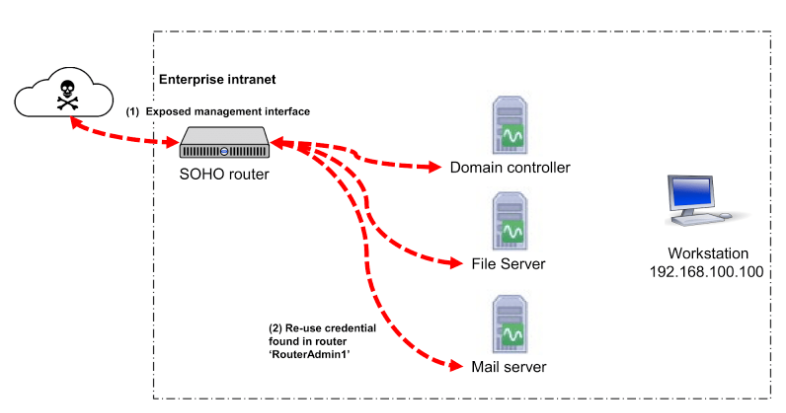
“… attempts to leverage any privileges afforded by the Fortinet device, extracts credentials to an Active Directory account used by the device, and then attempts to authenticate to other devices on the network with those credentials.”
This could run through the Active Directory account directly, or by applying its privileges to the account already under the attacker’s control via impersonation. Either way, where separation of accounts and segregation of duties are applied, a first logon event from a user account to a new endpoint should be straightforward to detect. This Cloud Security Alliance writeup sets out the likely scenario, with threat actors moving laterally from the edge device into one of the servers.
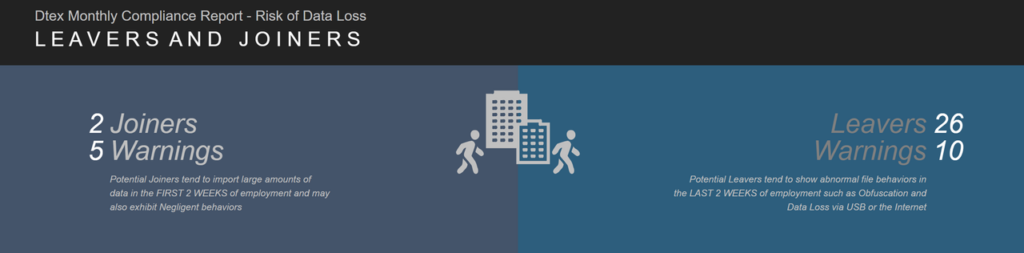
The user would also surface in the Leavers and Joiners dashboard, as outlined in iTA-24-07 i3 Threat Advisory: Inside the DPRK: Spotting Malicious Remote IT Applicants.
Logins to endpoints outside their account description
Organizations may never see the initial logon event, because a Domain Administrator account was used to configure their file servers. Even where that account has not logged in recently, no first logon event is generated.
Suspicious command line activity
Behavior monitoring here depends on close collaboration between the insider risk team and IT, to establish what server administration behavior and tool usage should look like. That collaboration is what makes the harder problems tractable: elevated privileges, shared tools, living-off-the-land techniques used by Chinese-based threat actors, and the range of tasks and environments individual administrators work across.
Supply chain compromise: PyTorch
PyTorch issued a security advisory after one of its nightly package updates was hijacked and malicious code added. An attacker placed a package of the same name in the PyPI index, which then took precedence during installation. The pattern resembles DLL preloading attacks.
The same technique could deliver malicious code during a routine system update, or a threat actor could exploit a supply chain attack to compromise an organization and then perform an update that looks entirely legitimate. Monitoring and reviewing this activity alongside earlier threat detections can meaningfully aid identification of malicious attacks.
Credential access
Domain controllers and some Linux servers store credentials directly on the endpoint, which makes them prime targets for harvesting account credentials and maintaining persistent access.
Windows Domain Controllers hold the ntds.dit file, containing Active Directory information including user account file hashes. Attackers may attempt to copy it for offline analysis — access is impossible while the server is online — and exfiltrate it for subsequent brute-force attacks against the hashes. Where attackers are using PowerShell and the required Windows event logging is enabled, as described in the PowerShell section below, queries can be run against that activity.
Linux servers store credentials locally across two files, passwd and shadow. An attacker who exfiltrates both can apply brute force password cracking methods to extract the credentials held within. Several methods exist for extracting these files with administrator privileges; an attacker might simply use the cat command to copy the contents into a file called test1.

Use of common directories to store stages of exploitation
Cyber attackers take advantage of easily accessible folders, which generally provide all users with read and write permissions by default. Depending on system configuration, these folders may also serve as accessible network shares, offering established access points.
Example:
C:\Windows\Temp
C:\Users\Public
C:\Users\Public\Appfile
C:\Perflogs
Threat actor uses PowerShell to enumerate event logs or other commands
Get-EventLog security -instanceid 4624 cmd.exe /C "wmic path win32_logicaldisk get caption,filesystem,freespace,size,volumename" "cmd.exe /c "netsh interface portproxy add v4tov4 listenaddress=0.0.0.0 listenport=9999 connectaddress=<rfc1918 internal ip address> connectport=8443 protocol=tcp""Organizations must enable Windows Event Logs and ensure the correct logs are selected for data capture. This generates the Activity_Group: WindowsEventLogActivity. Insider risk practitioners can then query and alert on the Microsoft-Windows-/Operational log for Event ID 4104. Note that these logs may not be enabled by default.
Filenames for previously known malware, scripts and tools
| backup.bat | cl64.exe | update.bat | Win.exe |
| billagent.exe | nc.exe | update.exe | WmiPrvSE.exe |
| billaudit.exe | rar.exe | vm3dservice.exe | WmiPreSV.exe |
| cisco_up.exe | SMSvcService.exe | watchdogd.exe |
Usage of PSEXEC
This one depends on how extensively psexec.exe is already used within the server environment. Where commands are issued through PowerShell with script block logging enabled, insider risk practitioners may be able to determine the actions taken. Where they are not, alerting on use of the executable can still be valuable for tracking valid accounts that may now be controlled by malicious threat actors.
PSEXEC example remote command execution:

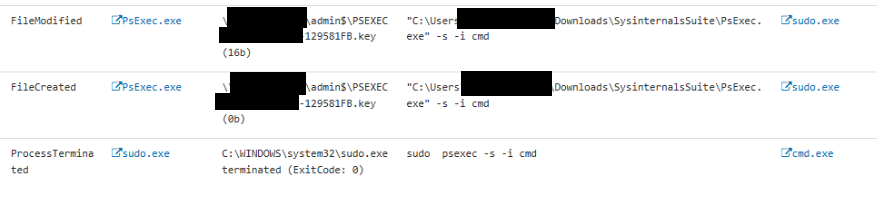
Regularly monitoring endpoints, particularly servers, for the presence of Microsoft Sysinternals tools is advisable. Server administrators may genuinely need these tools at times, but leaving them resident on endpoints creates a security risk that nation state actors are well positioned to exploit.
Insider threat profile
The table below summarizes how this espionage activity presents in behavioral telemetry, and where insider risk practitioners should look for it.
| Behavior | How it presents internally | Where to look |
|---|---|---|
| Initial foothold on edge devices | Exploitation of unpatched CVEs, credentials extracted from the device’s Active Directory account | Edge device patch status, admin account privilege boundaries |
| Abnormal hours of use | Administrator activity falling outside an established workday pattern | Forensic audit trail, hours of work baselines |
| Unusual login location | Source IP inconsistent with known administrator addresses or ISP, including via VPN | Geographical coverage dashboard, IP whitelisting |
| First logon to new endpoints | A user account authenticating to an endpoint it has never touched | First logon events, Leavers and Joiners dashboard |
| Logins outside account description | Domain Administrator activity on systems it configured but rarely uses | Account-to-system mapping, account description review |
| Suspicious command line activity | Living-off-the-land commands issued through native tooling | PowerShell script block logging, Event ID 4104 |
| Credential access | Copying of ntds.dit, or passwd and shadow files, staged for exfiltration | File access on domain controllers and Linux servers |
| Staging in common directories | Write activity in world-writable folders that may also be network shares | C:\Windows\Temp, C:\Users\Public, C:\Perflogs |
| Remote execution | psexec.exe use for lateral movement and privilege escalation | Sysinternals tool presence on servers |
| Supply chain compromise | Malicious code delivered inside a routine, legitimate-looking update | Package and dependency update monitoring |
Insider threat persona
The persona to hunt for is not a disgruntled employee. It is a server or domain administrator account behaving slightly outside its own history.
The account is legitimate. The credentials are valid. The tools it reaches for — PowerShell, wmic, netsh, psexec — are the same ones the real administrator uses. Interaction levels stay low, deliberately so, and each individual action can be justified in isolation. What gives it away is the shape of the activity around it: a login at an hour that does not fit the account’s pattern, from an address that does not fit its profile, onto a server it has no operational reason to touch, followed by file access on a domain controller.
Shared administrator accounts erode this signal badly, which is one more argument for enforcing separation of duties before an incident rather than during one.
Mitigations: what organizations should do now
Insider risk monitoring program
An insider risk management program identifies and mitigates risk posed by employees, contractors, and partners with access to sensitive information. By monitoring user behavior, integrating HR data, and tracking credential usage, organizations can detect anomalies and prevent data leaks, financial losses, and reputational damage. A program that works also builds security awareness and accountability, which strengthens organizational resilience well beyond this threat.
- Employee work groups: These provide a comparative behavioral baseline that flags deviation from established patterns. Enabled within a monitoring tool, they sharpen detections by allowing comparison against group norms, surfacing activity that falls outside typical job responsibilities.
- Hours of work: Monitoring work hours gets complex for global organizations. A forensic audit trail tracks user behavior over time and flags unusual situations, such as a user account appearing on an unexpected device.
- HR integrations: HR data supplies context that telemetry alone cannot, such as employee leave or role changes. Combined with hours of work and location data, it helps identify anomalies in employee availability and access patterns.
- Credential storage access monitoring: How and where credentials are stored is critical to early detection of compromise. Organizations should prevent employees from saving work credentials in personal accounts. Tools like DTEX Platform can use HTTP Inspection Filtering to detect where credentials are saved in browsers or other applications, identifying risky behavior before it leads to compromise.
Server monitoring for abnormal user behavior
Monitoring servers for abnormal user activity matters most in environments where users hold admin access and activity levels are generally low. Admin accounts carry elevated privileges, which makes them prime targets. Unexpected login times, access to sensitive files, or changes to system configuration can all signal a breach or an insider threat, and watching these closely lets organizations respond quickly enough to protect critical data.
The DTEX Platform detect and investigate section covers a range of server-specific actions that can be reviewed or monitored. Likely targets of nation state actors, critical infrastructure among them, will have organization-specific behaviors and indicators worth adding to the existing rule base for faster detection.
Encryption, patches and secure edge devices
Securing the system and its components is central to mitigating risk in the telecom industry. Telecom companies need robust encryption protocols to safeguard data transmitted across their networks and prevent unauthorized access.
Regular software updates patch the vulnerabilities attackers exploit. Monitoring user activity surfaces suspicious behavior early enough to intervene. Regular vulnerability scans identify weaknesses before they are used against you, and that scanning should extend to third-party and open-source software, including Python packages, as the PyTorch case demonstrates. Keeping edge devices current blocks unauthorized access and protects the network from external threats.
Relevant employee training
Training reduces the risk of accidental data breaches and makes sure staff recognize what a threat looks like when it reaches them. Programs should cover recognition of phishing attempts, proper data handling procedures, and the importance of reporting suspicious activity. A culture of security awareness encourages employees to take an active role in protecting sensitive information, and well-informed employees are considerably better placed to identify and respond to insider threats.
The bottom line
Insider threat detection depends on collaboration across the teams and tools watching your environment. Nation state adversaries, particularly those linked to China, are known for stealth. Their living-off-the-land techniques and low interaction levels are discreet, and they remain identifiable. Knowing your own environment well is what raises the probability of catching this activity early.
Investigations support
This advisory includes limited-distribution reporting available only to approved insider risk practitioners. To request access to the redacted material, log in to the customer portal or contact DTEX i³. For organizations assessing suspected related activity, DTEX i³ can provide additional intelligence, indicator support, and investigative guidance. Behavioral detections should be tested and tuned prior to enterprise-wide deployment, particularly in large environments where scale can affect signal quality and operational effectiveness.
Sources
- Identifying and Mitigating Living Off the Land Techniques | CISA
- Joint Guidance: Identifying and Mitigating Living Off the Land Techniques
- CSA_Living_off_the_Land.PDF
- Joint_CSA_Top_CVEs_Exploited_by_PRC_cyber_actors.PDF
- Volt Typhoon targets US critical infrastructure with living-off-the-land techniques | Microsoft Security Blog
FAQ
Watch administrator accounts for activity outside their established pattern: unusual login times, logins from unfamiliar devices or locations inconsistent with the account’s profile, first logons to new endpoints, and suspicious command line activity. Published indicators and known malware filenames support the hunt; behavioural baselines make deviation visible.
Once an attacker holds valid administrator credentials and works through native Windows tooling, the distinction between intruder and trusted insider stops being useful to a detection program. What remains is an account doing things it has no business doing, which insider risk telemetry is built to catch.
Insider risk management platforms combining behavioral baselines, HR context, and endpoint telemetry. DTEX Platform supplies employee work groups, forensic audit trails, geographical coverage and Leavers and Joiners dashboards, and HTTP Inspection Filtering for credential storage monitoring. Windows event logging covers Event ID 4104, where script block logging is enabled.
Get Threat Advisory
Email Alerts